Skip to content
EmberEmber

Subtitle your videos
in seconds, not hours.

The AI subtitling app for DaVinci Resolve. Ember removes the manual subtitle grind and keeps your entire process inside the timeline—turning audio into styled Fusion Text+ compositions effortlessly.

Timeline view
Frame snap01:04:22:12
No round trips
Overlay stays readable
Shift-drag merge
Frame-snapped split
Old workflow broke focus
Timing now stays native
Every line lands on frame
Re-stack before Resolve
Primary output stays clean
Timing stays inside one app
Workflow

Four steps from raw audio to timeline.

Resolve renders the source audio, Ember builds word-timed blocks, you shape them in the timeline, and styled Fusion Text+ lands back on the cut in one unbroken flow.

Generate

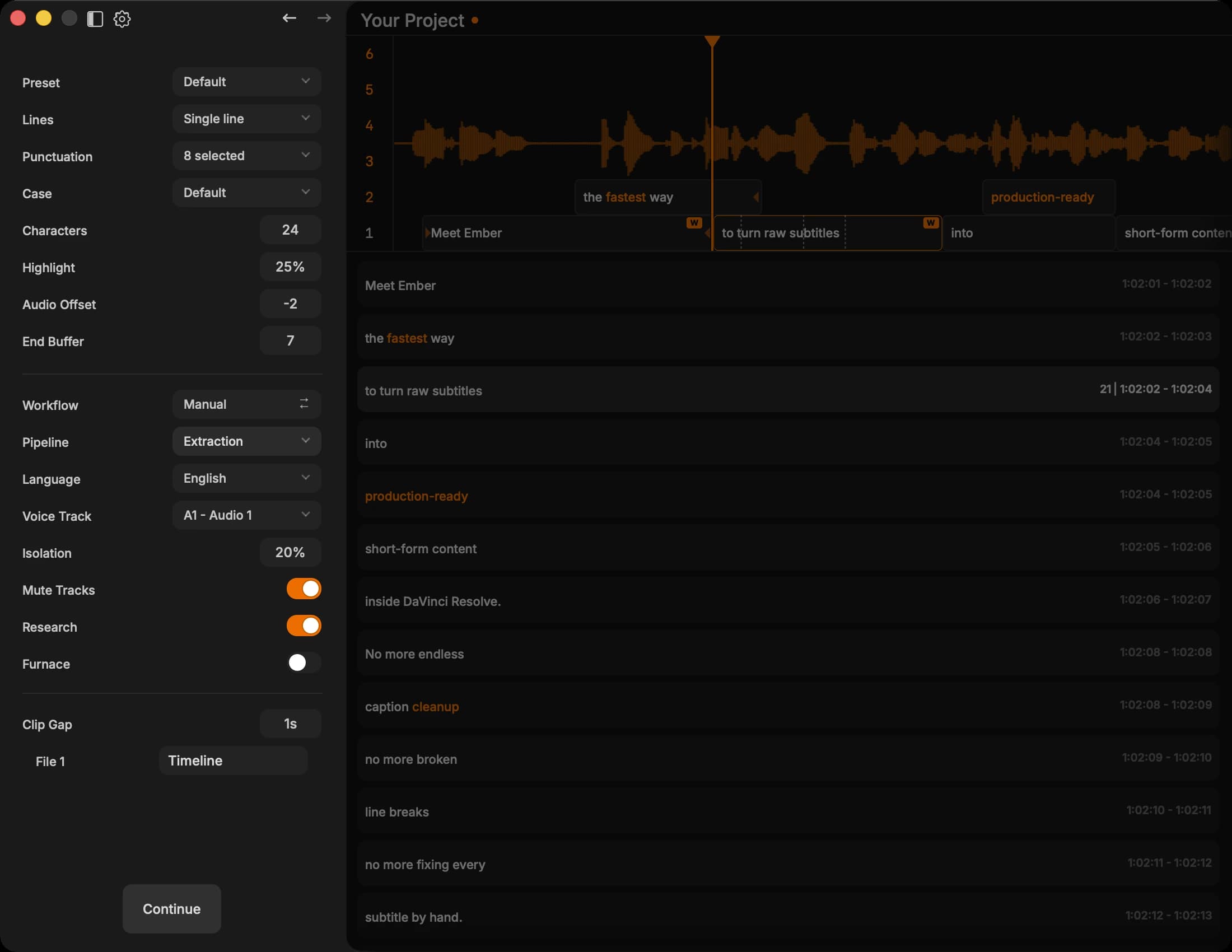
From Resolve timeline to word-timed blocks in one step

Point Ember at your Resolve timeline and it renders the audio, runs the AI engine, and delivers word-timed subtitle blocks — all without leaving the app.

SourceResolve renders audio from the active timeline — no export or file management.
EngineChoose extraction, script alignment, or translation. Each returns frame-snapped, word-level timestamps.
OutputSegmented subtitle blocks placed on a multi-track timeline, ready to edit.

Edit

Every edit snaps to frame boundaries — nothing drifts

Work directly on a scrollable waveform timeline with frame-locked precision. Split, merge, resize, and correct text — all without touching a timecode field.

TimelineScrollable waveform view with playhead scrubbing, rubber-band select, and anchor-preserving zoom.
ControlsH to split, Shift-drag to merge, edge-drag to resize, double-click to edit inline. Full keyboard-first workflow.
PrecisionPer-word timestamps and confidence coloring show exactly where the model was uncertain.

Arrange

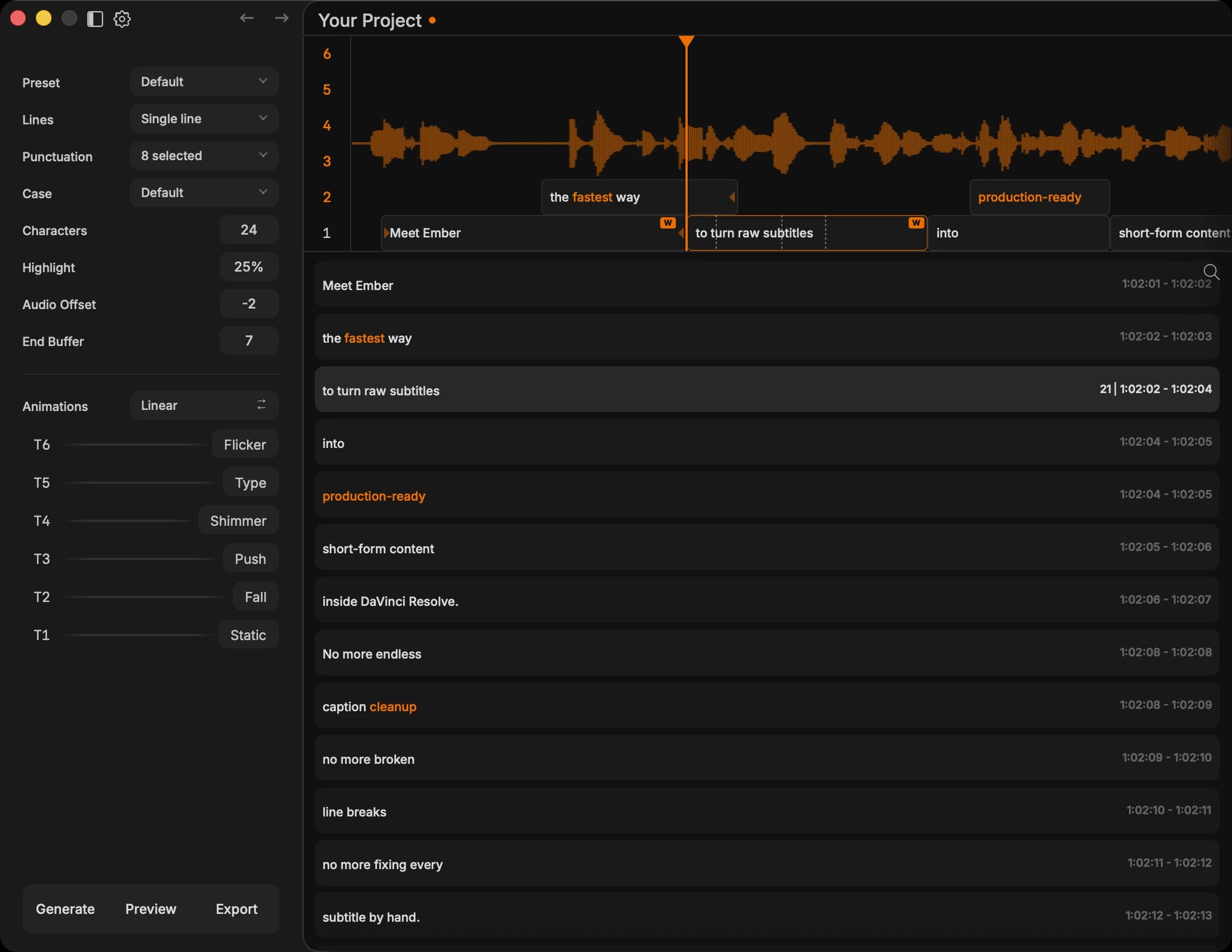
Three main + three overlay tracks, auto-distributed or hand-placed

Build layered subtitle stacks across six tracks. Auto-Shuffle balances block distribution automatically, or drag blocks to exact positions with main-track collision enforcement.

TracksST1–ST3 main (non-overlapping, tight), ST4–ST6 overlay (free placement). Add more if needed.
LayoutDrag to reposition, number keys to reassign tracks, edge-drag to adjust. Main tracks enforce gap rules automatically.
ResultClean layered stacks that stay readable when Resolve plays back at speed.

Ignite

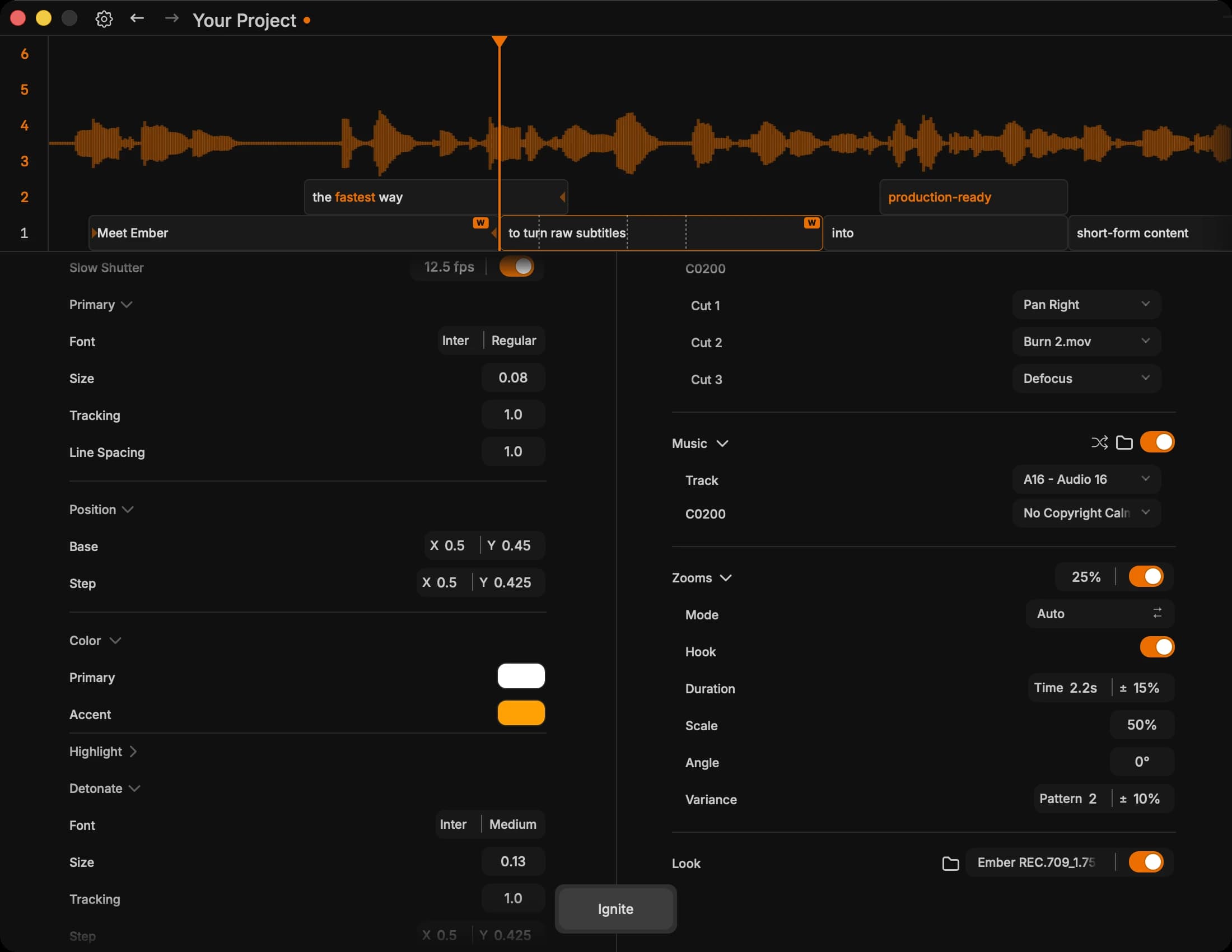
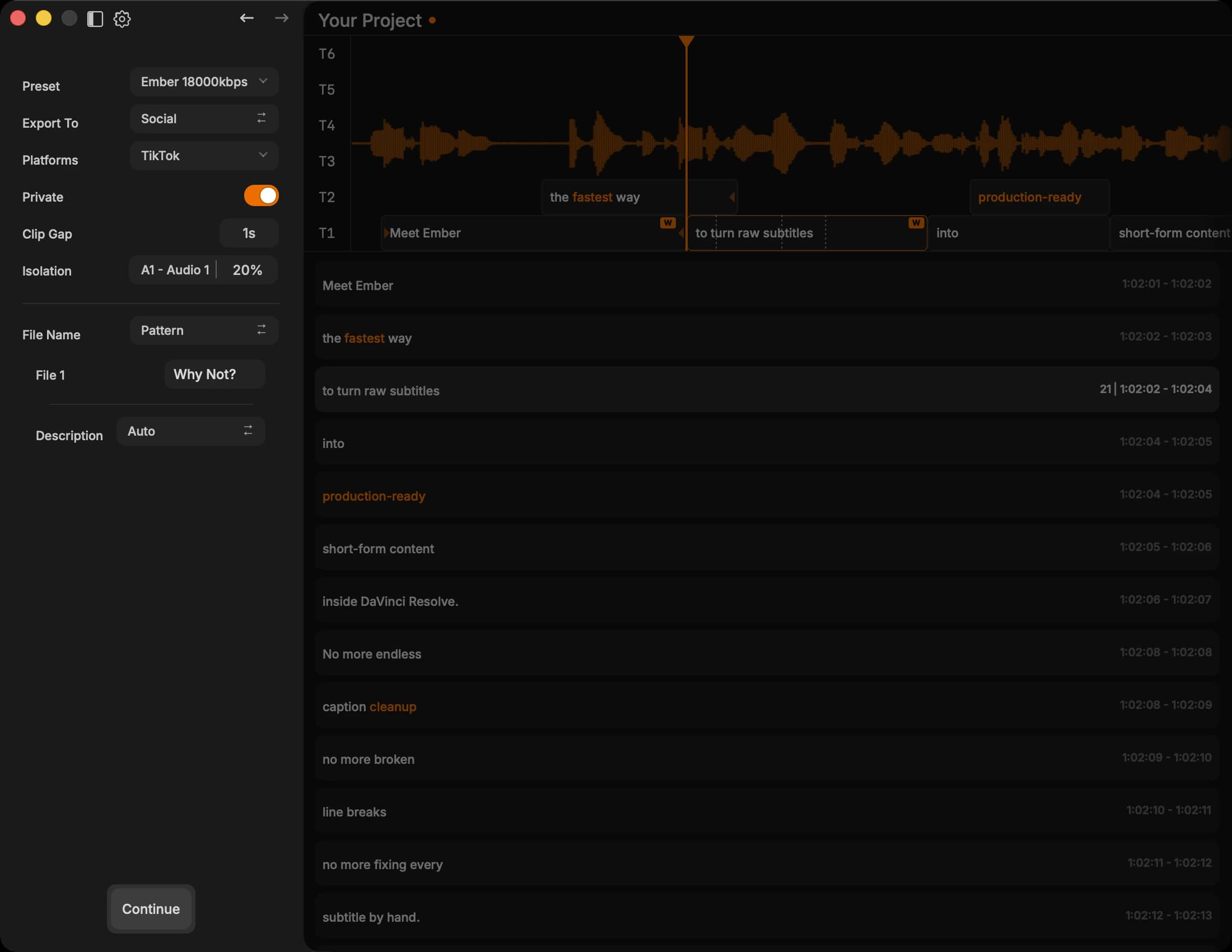
One click — styled Text+ compositions on the Resolve timeline

Push finished subtitles onto your Resolve timeline as real Fusion Text+ compositions. Templates, fade animations, and gap filling are applied automatically — no manual comp work.

DeliveryEach subtitle block becomes a styled Fusion Text+ composition on the target track.
ModesConcise mode fires fast. Explicit mode gives track-by-track control over placement and timing.
FinishTemplate styling, gap-fill logic, fade-in/out, and a native handoff back to the cut.
Why Ember

Built for editors who refuse to compromise.

Every feature exists to save you time, protect your accuracy, or keep you inside the tools you already use.

Minutes, Not Hours

AI transcription, intelligent refinement, and direct timeline injection mean you spend your time editing — not wrangling subtitle files.

Total Control

Word-level timestamps, frame-accurate timecodes, and a visual timeline editor let you fine-tune every single subtitle exactly how you want it.

Truly Resolve-Native

Subtitles land on your timeline as real Fusion Text+ clips with your own templates and styling — not flat SRT burns or clunky external overlays.

Layered Compositions

Starts with 6 subtitle tracks — 3 main + 3 overlay — and lets you add more as needed. Build layered text layouts from a single editor.

Visual Timeline Editing

A scrollable multi-track timeline with waveform visualization. Drag to reposition, edge-drag to resize, Alt+drag to duplicate. All timecodes snap to exact frame boundaries.

Refinement That Works

AI fixes grammar, punctuation, and diacritics while preserving what was actually said. Optional triple-pass verification catches phonetic errors that single passes miss.

Three Ways to Work

Match the mode to your project.

Every project is different. Ember gives you three distinct workflow modes so you always get the right output.

Default

Extraction

The default. Transcribe and refine audio into clean subtitles. Domain detection identifies technical terms and jargon before transcription — so it gets your vocabulary right the first time.

  • Word-level timestamps
  • Domain detection
  • AI grammar refinement
  • Triple-pass verification
Alignment

Scripts

Align pre-written text to audio timing with minimal changes. Perfect for voice-overs and pre-approved copy where the words are already finalized.

  • Text-to-audio alignment
  • Minimal text changes
  • Frame-accurate timing
  • Pre-approved copy
Localization

Translation

Natural localization with cultural adaptation — not literal word-for-word output. Subtitles that read naturally in the target language.

  • Cultural adaptation
  • 6+ languages
  • Natural phrasing
  • Frame-snapped output

Choose your plan.

Purchase a license to unlock access to Ember. Download and install instructions are provided immediately after purchase.

Entry
$20/mo

For solo creators & freelancers

50 credits / month

Top-ups available anytime — credits never expire

Everything you need to start subtitling with AI — fast, accurate, and integrated with Resolve.

Core pipeline

  • AI transcription & timing
  • Single-pass smart refinement
  • DaVinci Resolve integration
  • Windows & macOS

Pro / Studio only

  • Triple Pass accuracy mode
  • Research context injection
  • Priority processing queue
  • Batch workflow
Pro
Recommended
$35/mo

For professional editors shipping fast

100 credits / month

Top-ups available anytime — credits never expire

Full pipeline power with every accuracy mode, priority queue, and batch processing.

Everything in Entry, plus

  • Triple Pass — highest accuracy mode
  • Advanced research context
  • Priority processing queue
  • Batch workflow
  • Email support
Studio
Custom

For teams & production houses

Volume credits

Custom allocation & billing

White-glove onboarding, SLA guarantees, and dedicated account management for high-volume teams.

Everything in Pro, plus

  • Custom credit allocation
  • Dedicated support & SLA
  • Team onboarding & training
  • Custom API & integration
  • Dedicated account manager

Need more credits?

Buy top-ups anytime without changing your plan. Credits never expire.

Frequently asked questions

Access requires a license key.

WindowsmacOSDaVinci Resolve Integration